# ComfyUI-H3-Continuum 3.8.3 — V3.8X2
## Loader persistence repair on main (2026-09-21, after 3.8.3)
The current paired V3.8X2 workflows now use **Core Load Audio** and **Core Load Video -> H3 Continuum Video Adapter**. The adapter has Force Rate (default 24) and IMAGE/AUDIO outputs, but **no Enable switch or file selector**. Core owns video selection/upload/save; the established duration-preserving frame selection is reused and audio is passed unchanged. To disable Timeline Video guidance, bypass the adapter or the whole video-input group; do not bypass only Load Video while leaving its required-input adapter active.
**H3 Continuum Load Image remains**, including Enable Image. Its mode observer now delegates to inherited Core setters (Issue #23), and no longer replaces the widget collection while drawing or saving. Enable is appended after Core's widgets; Core handles the filename and native Bypass persistence. The older Audio/Video node IDs remain loadable as deprecated compatibility nodes, not as the recommended new-workflow loaders. Ten node IDs are registered including these two legacy nodes. Sampler inputs, generation parameters, Decode Cache, Finalize and existing latent/storage contracts are unchanged.
After updating, restart ComfyUI and reload/refresh the frontend. A workflow that already omitted its filename or saved an incorrect mode cannot recover those missing values: reselect the intended file and Bypass state, then save once. Existing user workflows and saved Takes are not automatically rewritten. Changing upstream node types can legitimately create a new Run Storage revision; preserve the original workflow when resuming accepted runs.
Validation details and limits: [Loader repair record](docs/LOADER_PERSISTENCE_REPAIR.md). CPU/store-model regression tests are not a substitute for the pending Windows Core 0.36.0 / frontend 1.53.6 browser tab-switch acceptance. No Release/tag or Registry publication is implied by this main-branch repair. Older loader screenshots below describe the retained legacy nodes.
## Timeline Video — Experimental on main
The existing video IMAGE input is now displayed as **`Timeline Video Frames`** and has one appended optional control, **`Video Reference Mode`**. Existing workflows and API calls that do not contain the new setting keep the old behavior through the default **`Repeat Reference`** mode.
- **`Repeat Reference`** keeps the legacy Video Guide contract: each physical generation group receives the same bounded prefix from the source. It does not loop or stretch a short source.
- **`Follow Timeline`** uses the 24 fps source interval corresponding to each physical output group. Continuation-prefix frames are not consumed twice. If the source ends, the remaining groups continue without video reference; a final usable partial interval may receive only H3's short frame-grid padding.
This setting is independent of `Prompt Format = Timeline`. It does not add a new socket or loader, does not use the source video's audio automatically, and does not provide frame-perfect motion copying. The complete decoded IMAGE batch is still held in system memory, so this feature is not a long-input RAM optimization.
Use the existing connection:
```text
Core Load Video -> H3 Continuum Video Adapter -> Timeline Video Frames
```
The two comparison workflows are intentionally separate from the unchanged official V3.8X2 workflows:
- [Follow Timeline JSON](examples/workflows/MiniMax_H3_Continuum_V38X2_Timeline_Experimental_Follow.json) | [ZIP](examples/workflows/MiniMax_H3_Continuum_V38X2_Timeline_Experimental_Follow.zip)
- [Repeat Reference JSON](examples/workflows/MiniMax_H3_Continuum_V38X2_Timeline_Experimental_Repeat.json) | [ZIP](examples/workflows/MiniMax_H3_Continuum_V38X2_Timeline_Experimental_Repeat.zip)
Local acceptance passed with full CPU `1424 passed / 1 skipped / 0 failed`, browser save/reload, and Follow/Repeat `2 x 5 s` GPU runs at 704x416, 24 fps, 240 frames, and 10-second 32 kHz stereo audio. Follow changed to the later source interval for Chunk 2 while Repeat retained the shared prefix; both completed without OOM, NaN, allocation failure, or crash. Peak observed VRAM was about 15.6–15.7 GiB on the tested RTX 5060 Ti 16 GB system, so 16 GB headroom was small. This is a functional mode-separation result, not a universal speed or subjective-quality guarantee. See [Timeline Video Experimental](docs/TIMELINE_VIDEO_EXPERIMENTAL.md).
> **V3.8X2** is the product and workflow label for package metadata `3.8.3`. Current `main` includes the post-3.8.3 loader-persistence repair: the official workflows use Core Load Audio and Core Load Video -> H3 Continuum Video Adapter, while the deprecated Continuum Audio/Video loader IDs remain registered for saved-workflow compatibility. V3.8X2 also includes optional Reference Images 4–9 and the built-in Decode Cache Helper. Timeline Video remains Experimental on `main`. The older V3.8.0 package remains available from tag [`v3.8.0`](https://github.com/ukr8b3g-cmyk/ComfyUI-H3-Continuum/tree/v3.8.0).
## Official V3.8X2 workflows
- **Standard name:** [JSON](examples/workflows/MiniMax_H3_Continuum_V38X2.json) | [ZIP](examples/workflows/MiniMax_H3_Continuum_V38X2.zip)
- **Helper-explicit name:** [JSON](examples/workflows/MiniMax_H3_Continuum_V38X2+Decode_Cache_Helper.json) | [ZIP](examples/workflows/MiniMax_H3_Continuum_V38X2+Decode_Cache_Helper.zip)
The two names contain the **same official graph**; they are distribution aliases, not different configurations. Both include the built-in Decode Cache Helper with its saved `Auto / RAM 256MB / Disk 8GB / reset_token 0` settings and the nine-reference helper connection. Each ZIP contains only the correspondingly named JSON. Older V3.8X workflows remain available for existing projects.
## Nine Reference Images: memory warning
Reference Images 1–3 connect directly to the Sampler. Optional images 4–9 connect through `H3 Continuum Reference Images` and then to `Reference Images (Optional)`. Using all nine is a high-resource configuration, not the normal minimum requirement.
The acceptance run completed on an **RTX 5060 Ti 16 GB / 64 GB system** only after the nine source references were kept near **0.30 MP each**. With `512 × 608` output, `3 × 5 seconds`, Spectrum Off, LoRA Off, Sage Attention, and Balanced 22-frame continuity, Sampling used about **15.0–15.5 GiB of 16,311 MiB VRAM**. There was little 16 GB headroom.
When using many references, especially all nine, resize copies of the source images to about 0.30 MP before loading or connecting them. The Sampler still performs its normal conditioning resize, but smaller source files reduce input and preprocessing pressure. Larger references, larger output sizes, extra wrappers, or concurrent GPU work may require a higher-spec GPU and more system RAM. Nine references are optional and are not guaranteed to improve quality over three.
## Built-in Decode Cache Helper
### Important: this is not an unconditional new-generation speedup
**Manual cache clear:** normally no action is needed. Press the Helper's **Clear cache** button (Japanese UI: **キャッシュをクリア**) to discard that Helper's cache on the next Queue and run native Decode again. It does not delete immediately or queue automatically. The internal `reset_token` remains serialized for workflow/API compatibility and increments once per click (wrapping to 0 at the INT limit). Creating, loading, or cloning a node does not change it. Without JavaScript, or in API workflows, change `reset_token` through the traditional numeric input.
**The Helper saves time only when unchanged latents are decoded again. It does not accelerate Sampling.** A first MISS runs native Decode and stores the result; hashing and storage can make that run slower. Generating different latents with a new random seed each time normally produces MISS, so this feature should not be expected to speed up that usage.
Concrete reuse scenarios:
- **Continue by adding chunks:** when existing chunk latents are retained and decoded again for output, cached existing chunks can HIT; newly generated chunks initially MISS.
- **Fix / partial regeneration:** unchanged chunk latents can HIT when submitted again; regenerated chunks whose latent contents changed MISS.
- **Complete / Resume output:** decoding retained latents again without resampling can benefit. Merely playing an existing video file is not a cache use case.
- **Retry from Decode onward, or change Finalize/output settings:** reuse applies when the same latents and decode-related metadata reach the Helper and Decode runs again.
- **Regenerate with a fixed seed:** reuse requires identical resulting latent contents. The same seed alone does not guarantee HIT.
The action names themselves do not enable reuse. **Each Video/Audio entry must match in latent contents, shape, dtype, decode-related metadata, and VAE identity, and its cache entry must still exist in that Helper.** If ComfyUI reuses an existing output without executing Decode, there is no additional Decode saving attributable to this Helper. Connect the Helper and select `Auto` or `RAM`. In its report, `hit` means reuse, `miss` means native Decode, and `off` / `bypass` mean no cache reuse.
Cache reuse is process-local and does not survive Python restarts. Eviction and VAE identity changes can also cause MISS. Changing mode, RAM/Disk budgets, or `reset_token` clears this implementation's Helper cache. Keeping `reset_token = 0` does not reset it on every Queue.
V3.8X2 ships `H3DecodeCacheHelper` inside this Continuum package. It remains a separate public node under `MiniMax H3/Continuum/Helpers`; no second custom-node addon is needed. The package registers ten IDs, including the Video Adapter and the two deprecated loader compatibility IDs. Sampler, Finalize, Assembly Plan, Core Decode, and the pre-existing saved Sampler widget/socket prefix are unchanged; Timeline Video adds only one optional widget at the end.
Connect Sampler `video_latents` and `audio_latents` plus their native Video/Audio VAE inputs to the Helper, then connect Helper `images` and `audio` to Finalize. Keep the Sampler `assembly_plan` directly connected to Finalize. The [official V3.8X2 workflow](examples/workflows/MiniMax_H3_Continuum_V38X2.json) preserves its saved graph and settings. It contains no Core VAE Decode nodes, so returning to Core direct Decode requires adding those two Core nodes and reconnecting Finalize, or loading a prior Core-direct V3.8X workflow. Do not simply remove the Helper and expect automatic rewiring.
`Auto` caches full physical Video decodes on private process-local disk and small Audio decodes in bounded RAM. `Off` delegates native Decode and clears the Helper cache. Cache failure falls back to native Decode; native Decode, OOM and queue interruption are not retried. Files are not reused across Python restarts. Keep only one provider of the `H3DecodeCacheHelper` node ID: the previous standalone addon must be disabled or removed during the migration, after a verified built-in installation.
At 736×416 (0.306MP), 3×5 seconds, Euler/simple 6 steps, Turbo FL2V v1.2, a warm backend and three Video HITs, one measured configuration produced a **mechanistic estimate of about 47 seconds / 24.5% less Full Run Total**. One direct A/B pair observed 50.887 seconds / 26.46%, and two Complete/Resume re-decode pairs averaged 46.309 seconds / 79.826% less Total. These are narrow observations, not repeated universal averages or an unconditional 20%+ speed promise. The first MISS can be slower, new Sampling is not accelerated, and a changed latent or VAE identity produces a MISS.
**Historical V3.8X workflow: [JSON](examples/workflows/MiniMax_H3_Continuum_V38x.json) | [ZIP](examples/workflows/MiniMax_H3_Continuum_V38x.zip)** — [Published releases](https://github.com/ukr8b3g-cmyk/ComfyUI-H3-Continuum/releases)
✅ V3.8X on `main` includes the September 8, 2026 Review hotfix: Review Each Chunk continuation, stale `Regenerate From` state, completed-sequence extension, and Render History queue handling are repaired. Update with `git pull --ff-only origin main` (or ComfyUI Manager **Update**), restart ComfyUI, and hard-refresh the browser if the old UI remains. Existing saved Takes are preserved. Issue #13 remains a separate open long-continuation quality issue and is not part of this hotfix.
H3 Continuum is a Production Sampler for generating, reviewing, partially regenerating, and resuming long-form MiniMax H3 video without restarting the entire work. V3.8 has two product layers: **Main / Production** and **Advanced**.
## Install or update first
For a new Git installation:
```bash
cd ComfyUI/custom_nodes
git clone https://github.com/ukr8b3g-cmyk/ComfyUI-H3-Continuum.git
```
For an existing Git checkout:
```bash
cd ComfyUI/custom_nodes/ComfyUI-H3-Continuum
git pull --ff-only origin main
```
Restart ComfyUI after cloning or pulling. If ComfyUI Manager installed the node, use its **Update** action instead of mixing Manager updates with a second Git checkout.
To install the historical V3.8.0 package into a separate checkout instead:
```bash
cd ComfyUI/custom_nodes
git clone --branch v3.8.0 --single-branch https://github.com/ukr8b3g-cmyk/ComfyUI-H3-Continuum.git ComfyUI-H3-Continuum-v3.8.0
```
Use only one Continuum checkout at a time. ComfyUI Manager **Update** tracks `main`; it does not select historical tags.
Download the current V3.8X2 workflow: [JSON](examples/workflows/MiniMax_H3_Continuum_V38X2.json) or [ZIP containing the same JSON](examples/workflows/MiniMax_H3_Continuum_V38X2.zip). This is one Spectrum-capable graph, also usable with [LightX2V Turbo](https://github.com/ModelTC/Minimax-H3-Turbo); both Spectrum and all Turbo LoRA entries are saved disabled. Install its external Spectrum, rgthree, and KJNodes nodes before opening it. ComfyUI-Easy-Use is not required. See [Spectrum and Turbo setup](#turbo-lora-and-spectrum-in-supplied-workflows) below.
## Prompt and skill downloads
- [LLM system prompt ZIP](H3-Continuum-LLM-System-Prompt-v1.zip) — system instructions and reference material for Continuum prompt authoring.
- [Continuum prompt skill ZIP](H3-Continuum-Skill-v1.zip) — general chunk-aware prompt authoring for Codex and other compatible agents.
- [Continuum Dance Director skill ZIP](minimax-h3-continuum-dance-director.zip) — long-form choreography prompts for one primary dancer, with body and camera continuity across chunks.
These are optional prompt-authoring resources, not ComfyUI custom nodes. Extract each ZIP and follow its included instructions. They do not change the sampler or guarantee generated motion or image quality.
## You can ask an AI to read this manual
This README is intentionally detailed. You do not have to memorize it. Give its GitHub URL or this file to a web-enabled AI, describe your target video, GPU/VRAM, available First Image/audio, and whether you want to review every chunk. Ask it to use the **exact V3.8 labels** below.
Example request:
```text
Read the current ComfyUI-H3-Continuum V3.8 README. I have a 16 GB GPU and want
to create a 30-second I2VA video, reviewing every chunk. Tell me exactly which
Continuum inputs and controls to use, what must stay fixed between Queue runs,
and what output length I should expect after each action. Do not use older V3.7 UI.
```
AI products, plans, and repository-reading behavior change frequently. If a URL is not read correctly, paste or upload this README instead. Do not send private workflows, local paths, tokens, or credentials to a public AI service. The README and the UI remain the source of truth; an AI summary can still be wrong.
## V3.8 supported surface
The package registers ten node IDs, including two deprecated loader compatibility IDs. Current workflows use Core Load Audio and Core Load Video plus the Video Adapter.
- **H3 Continuum Sampler V3.8** — the Main sampler
- **H3 Continuum Finalize** — decoded Video/Audio assembly with optional seam handling
- **H3 Continuum Load Image**
- **H3 Continuum Load Audio** (legacy compatibility; new workflows use Core Load Audio)
- **H3 Continuum Load Video** (legacy compatibility; new workflows use Core Load Video + Video Adapter)
- **H3 Continuum Video Adapter** — Core VIDEO to H3 IMAGE/AUDIO, default 24fps, no Enable
- **H3 Continuum Second Pass** — the Advanced bridge for external latent processing or upscaling
- **H3 Continuum Reference Audios** — an ordered Reference Audio 1/2/3 bundle helper
- **H3 Continuum Reference Images** — optional additional Reference Images 4–9
- **Decode Cache Helper** — the existing optional decoded-result cache
The current frontend uses `Show Advanced Settings` / `Hide Advanced Settings` to change presentation without changing generation values. Saved drafts that still contain the former frontend-only `H3 Continuum View` property are migrated to the matching collapsed/expanded view and the legacy property is removed. If the frontend extension is unavailable, the complete Python-defined interface remains visible and executable.
The official V3.8X2 workflow uses the Helper path:
```text
H3 Continuum Sampler V3.8
-> Decode Cache Helper
-> H3 Continuum Finalize
-> Create Video
-> Save Video
```
The Helper delegates cache MISS entries to native Core Video/Audio Decode. A manually wired direct Core Decode path remains supported, but it has no decoded-result cache. Save and upscaling remain external. Hi-Res Fix is not part of the V3.8X2 standard workflow; use Second Pass as the bridge when an external latent processor or upscaler is needed. External processors may change only Video LATENT spatial geometry while preserving physical groups, B/C/T, finite values, first-pass Audio, and the original Assembly Plan. Finalize accepts public `IMAGE`/`AUDIO` outputs and does not require a specific decoder class. SageAttention, Sol-Attn, and Spectrum remain external MODEL wrappers. See the [V3.8 Open Integration Contract](docs/V38_OPEN_INTEGRATION_CONTRACT.md).
## Complete V3.8 UI reference
This section covers the current ten-node V3.8X2 public surface and the Sampler controls. Names such as `Power Lora Loader (rgthree)`, Spectrum, SageAttention, Core VAE Decode, and Core Save Video belong to ComfyUI or another extension. They may be used in a supplied workflow, but they are not Continuum controls.
### H3 Continuum Sampler V3.8: required graph inputs
| Input | What it does | Normal use |
|---|---|---|
| `model` | MiniMax H3 diffusion model, including any upstream MODEL wrappers or selected LoRA | Required |
| `clip` | MiniMax H3 text encoder | Required |
| `video_vae` | Encodes connected image conditioning; Continuum does not use it for final decoding | Required by the node; unused by pure T2VA |
| `sampler` | ComfyUI sampling algorithm | Required |
| `sigmas` | Noise schedule and effective step count | Required |
| `Sequence Prompt` | Complete text, list, timeline, or JSON sequence prompt | Required |
The Sampler returns six outputs: a list of `video_latents`, a list of `audio_latents`, one `assembly_plan`, a text `status`, the selected `driving_audio` when used, and a `refine_context` for the Advanced Second Pass. Raw latent lists normally go through Core Video/Audio Decode before Finalize.
### H3 Continuum Sampler V3.8: optional media inputs
| Input | Role | Important distinction |
|---|---|---|
| `first_frame` | First Image for I2VA or FL2VA | Can also supply the output aspect ratio when `Size Source = First Image` |
| `last_frame` | Optional final-image constraint for FL2VA | Can trigger a Long Terminal Merge; the final pair may become one atomic review unit |
| `reference_image_1`–`reference_image_3` | Ordered appearance, identity, subject, or scene references | They never become the implicit size source |
| `Reference Images (Optional)` | Additional images 4–9 bundled by `H3 Continuum Reference Images` | Empty inputs are skipped; encoding remains in the Sampler |
| `Timeline Video Frames` | The Video Adapter's 24 fps IMAGE frame batch | `Repeat Reference` keeps the legacy shared prefix; experimental `Follow Timeline` selects successive physical output intervals. Source audio is separate. |
| `Driving Audio` + `Driving Audio VAE` | Original audio timeline used as native guide conditioning | The selected source audio becomes final audio; generated audio and Audio Seam are bypassed |
| `Reference Audio (Optional)` + `Reference Audio VAE (Optional)` | Legacy single conditioning-only audio reference | Generated audio remains final audio |
| `Audio References (Optional)` | Ordered bundle from `H3 Continuum Reference Audios` | Do not connect this together with the legacy single Reference Audio path |
| `Still Image Guide (Optional)` | Compatibility socket inherited from the V3.7 guide contract | Experimental; not part of the V3.8X2 official workflow |
#### First Image, Last Image, and Reference Images
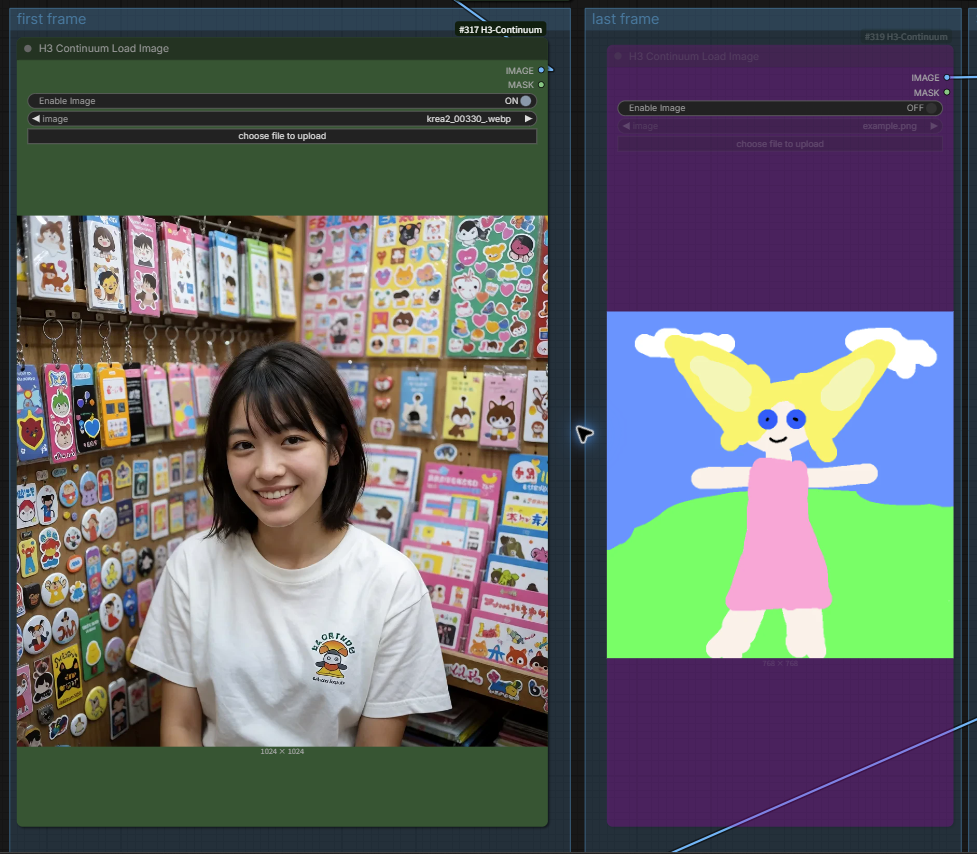
- **First Image** establishes the opening image and is the normal visual starting point for I2VA/FL2VA. It is also the only media input that can drive `Size Source = First Image`.
- **Last Image** constrains the sequence ending. Leave it `OFF` for T2VA and ordinary I2VA. With a connected Last Image, extending or regenerating the sequence may rebuild the terminal pair.
- **Reference Images 1–9** guide identity or appearance throughout generation. Inputs 1–3 remain on the Sampler; optional inputs 4–9 are on `H3 Continuum Reference Images`, connected to the Sampler's `Reference Images (Optional)` socket. The helper only bundles images: resizing, hashing, and VAE encoding remain in the existing Sampler path. Empty slots are skipped; Picture numbers follow active slot order after any First/Last Image. Existing three-loader templates still work unchanged.
#### Timeline Video Frames and Video Reference Mode
Connect `Core Load Video` to `H3 Continuum Video Adapter`, then connect Adapter `images` to `Timeline Video Frames`. The Adapter's default `Force Rate = 24` matches the input contract. Connect Adapter `audio` to `Driving Audio` only when that source audio should guide generation and become the final audio.
`Video Reference Mode` is visible only while Timeline Video Frames is connected. `Repeat Reference` is the compatibility default. `Follow Timeline` advances through the source according to the physical visible frames actually added to the output, including Review, Resume, and Terminal Merge grouping. It does not change `Seconds per Chunk`; all chunks still use the Sampler's common duration. See the [experimental contract and limitations](docs/TIMELINE_VIDEO_EXPERIMENTAL.md).
Saved workflows with the earlier direct image 4/5 inputs migrate those links into a bundle after graph loading. Migration preserves the original source links and only removes a legacy input after its new link is verified. If a source is unavailable or its destination is occupied, the legacy link is retained with a warning. Old API prompts remain accepted; supplying both legacy and bundle images for the same slot is an explicit input conflict.
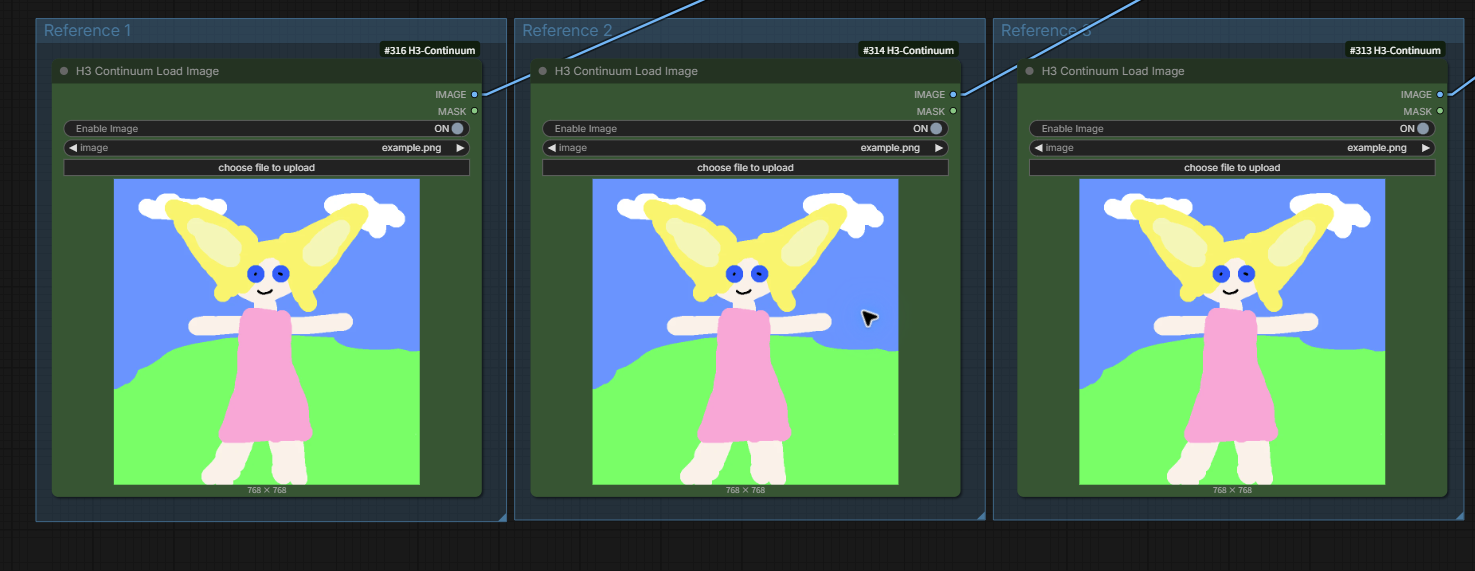
Every `H3 Continuum Load Image` has `Enable Image`. `ON` loads through ComfyUI Core. `OFF` uses native node bypass and makes that optional path behave as unconnected without deleting the node or cable. First, Last, and up to nine Reference Image inputs can therefore be connected without forcing every input to be active. An empty image bundle returns no reference and does not change the zero-to-three-image sampling/reuse contract.
| Public loader | Controls | Outputs |
|---|---|---|
| `H3 Continuum Load Image` | `Enable Image`, `image` file | `IMAGE`, `MASK` |
| `H3 Continuum Load Audio` | `Enable Audio`, `audio` file | `AUDIO` |
| `H3 Continuum Load Video` | `Enable Video`, `Video` file, `Force Rate` | `images`, `audio` |
#### Video, audio, and their bypass switches
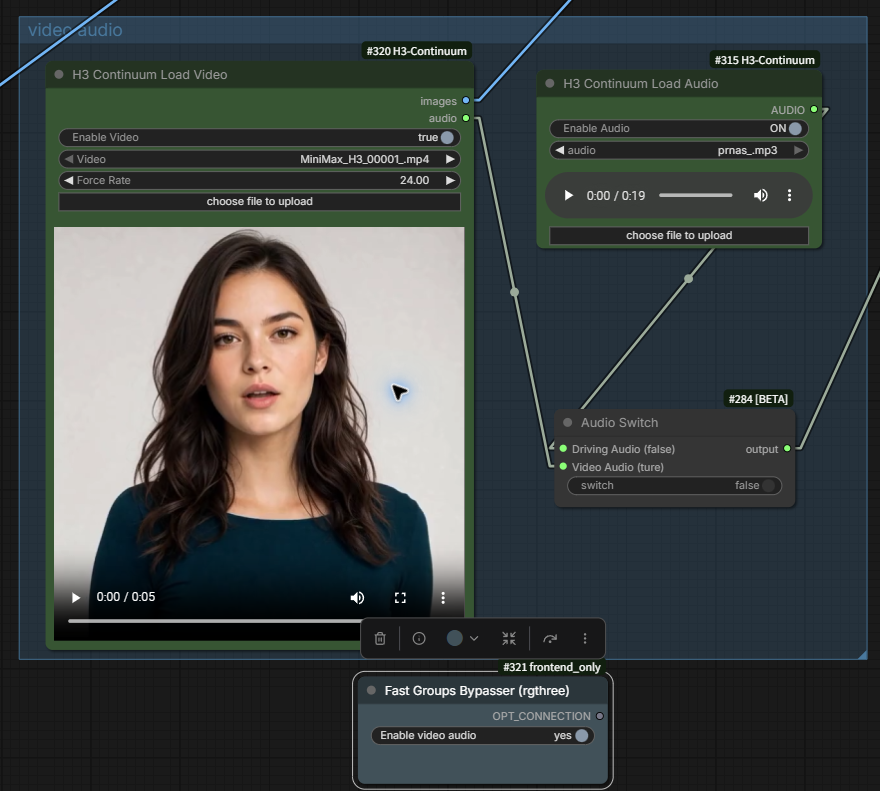
- New workflows use Core `Load Video` followed by `H3 Continuum Video Adapter`. The Adapter's positive `Force Rate` drops/duplicates frames while preserving nominal duration and passes audio through unchanged. Connect `images` to `Timeline Video Frames`; connect `audio` to `Driving Audio` only when the source audio should guide and become the final output. The legacy `H3 Continuum Load Video` remains registered for compatibility.
- `H3 Continuum Load Audio`: `Enable Audio` and the audio file. Use it for Driving Audio or Reference Audio according to the socket you connect.
- The node titled `Audio Switch` in the example image is ComfyUI Core's `If/Else Switch` (`ComfySwitchNode`); `Fast Groups Bypasser (rgthree)` belongs to the rgthree extension. Neither is a Continuum node or a requirement of Continuum. The Continuum loaders already provide their own native ON/OFF controls.
`Audio Continuity` is different from both audio inputs: it passes the previously generated audio context into the next generated chunk. It does not import a source track. Driving Audio replaces final generated audio; Reference Audio only conditions generation.
### Main Sampler controls
| Displayed control | Meaning | Recommended starting point |
|---|---|---|
| `Prompt Format` | `Auto`, `Fixed`, `List`, or `Timeline` interpretation of `Sequence Prompt` | `Auto` unless you need to force one parser |
| `Continuity` | Prior Video context retained at each chunk boundary | `Balanced — 22 frames` for Standard audiovisual continuation |
| `Base Seed` | Base for deterministic per-chunk seed derivation | Keep the value unchanged when continuing, comparing, or selecting Takes |
| `Control After Generate` | What ComfyUI does to `Base Seed` after a Queue | `fixed` for `Review Each Chunk`, resume, and controlled comparisons |
| `Audio Continuity` | Carries generated-audio context across boundaries | `true` for normal audiovisual generation |
| `Chunks` | Planned total chunk count, from 1 to 16 | Enter the final total, not the number to add next |
| `Seconds per Chunk` | Duration shared by every chunk | 5–15 seconds is the validated range; see duration notes below |
| `Total Length` | Read-only `Chunks × Seconds per Chunk` | Check only; it never edits either input |
| `Size Source` | `First Image` or `Manual` output geometry | First Image for I2VA/FL2VA; Manual for T2VA or exact dimensions |
| `Resolution` | First-Image sizing preset | `Draft — 0.30 MP` for tests, `Balanced — 0.60 MP` for more detail, or `Native 768` for the H3-native short edge |
| `Custom MP` | Custom First-Image pixel budget | Visible only when `Resolution = Custom` |
| `Width` / `Height` | Exact output canvas in 32-pixel steps | Visible/editable only in Manual mode; 32–16384 is accepted |
| `Run` | `Generate Full Video` or `Review Each Chunk` | Use Review when you want a human decision after each physical group |
| `Progress` | Saved raw chunks, safe resume, and Take history | Review turns it On automatically; enable it for resume/regeneration |
| `Ready to Queue` | Plain-language summary of the next Queue | Read it before pressing ComfyUI's top-right blue `Run` button |
| `Show Advanced Settings` / `Hide Advanced Settings` | Shows or hides technical controls | Visibility only; it does not change their values |
`Continuity = Balanced — 22 frames` with `Continuation Backend = Standard` and `Audio Continuity = true` uses the current Masked AV route. `Fast — 5 frames`, `Strong — 39 frames (Experimental)`, and `Auto — conservative` safely resolve to the older Reference Context route while generated-audio continuity is on. With Audio Continuity off, Standard uses the Video-only masked route.
#### Choose First Image sizing or Manual sizing
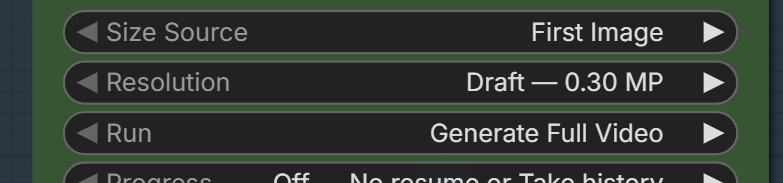
`Size Source = First Image` preserves the connected First Image aspect ratio. `Resolution` then chooses its pixel area:
| Preset | Target |
|---|---|
| `Draft — 0.30 MP` | Fastest and lowest-memory First Image starting point |
| `Balanced — 0.60 MP` | More detail with greater memory and processing cost |
| `Native 768` | 768 px short-edge target with a 1344 px long-edge cap |
| `Custom` | `Custom MP` selected by the user; separate from the Native 768 cap |

`Size Source = Manual` ignores the preset and uses exact Width/Height values. Both must be multiples of 32. Manual is the normal choice for T2VA and also supports a 32×32 diagnostic canvas when only generated audio is being checked.
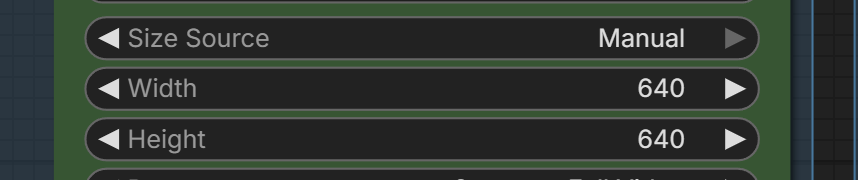
If First Image mode is selected but no usable First Image reaches the Sampler, V3.8 uses the stored Manual Width/Height as a safe fallback and reports the dimensions in `status`. Select `Size Source = Manual` to inspect or edit those values; Width/Height are hidden in the First Image facade. Reference Images and Timeline Video Frames never become implicit size sources. The historical `Auto / Landscape / Portrait / Square` values are migration/API compatibility values, not current Main choices.
Size selection is built into the V3.8 Sampler. A separate megapixel, empty-latent, or image-size node is not required for the normal Continuum workflow.
#### Choose a chunk duration
- **5 seconds** is a valid H3 duration and the fastest practical choice for workflow checks, Review UI checks, and quick Takes.
- **8–10 seconds** usually reduces the number of handoffs while keeping each Queue easier to review and rerun.
- **15 seconds** is the [upstream MiniMax H3 native maximum per generation](https://github.com/MiniMax-AI/cli/blob/main/skill/h3-video/SKILL.md) and minimizes the number of boundaries, but it increases per-chunk time and memory. Longer is not automatically higher quality.
- Continuum accepts 4–30 seconds for compatibility and experimentation. Values above 15 seconds are not the same as an upstream native-duration recommendation and can be expensive at high resolution.
For an audio-only listening diagnostic, use T2VA, `Size Source = Manual`, and a very small canvas such as 32×32, then play the saved video and ignore its picture. This is useful for hearing music or boundary continuity; it is not evidence of normal-resolution video quality.
### Advanced Sampler controls
| Control | When it appears | Meaning |
|---|---|---|
| `Continuation Backend` | Advanced open | `Standard` is the V3.8 path; `Compatibility` restores the older Reference Context route for comparison |
| `Regenerate From` | Advanced open and Progress On | `Auto` resumes the longest compatible prefix; `Chunk N` reuses earlier chunks and rebuilds N through the target |
| `Variation Nonce` | Explicit `Regenerate From = Chunk N` | `0`: automatic variation selection with interrupted-run resume; `1` or higher: a fixed variation value. Base Seed and the other generation settings stay unchanged |
| `Run Name (Optional Override)` | Advanced open and Progress On | Stable name for resume and Render History; blank uses the Sampler's automatic identity |
| `Reference Image Size` | Advanced open and a Reference Image connected | `Match Output` is practical; `Max Identity` preserves more reference detail and may use more memory |
| `Video Guide Size` | Advanced open and Timeline Video Frames connected | `Efficient — 0.4 MP`, `Balanced — 0.6 MP`, or `Match Output` |
Frontend-managed IDs, selected Take IDs, one-shot review actions, diagnostics, preview, and legacy compatibility values are deliberately not editable as ordinary node widgets. The corresponding settings or action buttons below are the supported interface.
### Review-state controls
When `Run = Review Each Chunk`, `Progress` is On, and a review unit is ready, the settings view changes to this action view:
| Button | What the next top-right ComfyUI `Run` does |
|---|---|
| `Use it and continue` | Accepts the current result, reuses it, and generates one next physical group |
| `Try this chunk again` | Keeps the earlier accepted prefix and creates another Take of the current review unit |
| `Start again from Chunk 1` | Selects a fresh branch from Chunk 1 with current settings and automatic variation; press Queue afterward. Saved Takes are kept. The selection resets to Auto after Queue |
| `Use it and finish the rest` | Accepts the current result and generates every remaining group without further review pauses |
| `Back to Settings` | Shows the normal settings; does not queue, reset, or discard the review |
| `Return to Review` | Returns from settings to the pending review; does not undo edited values |
| `Render History — N Takes` | Opens or closes stored Take browsing; N is Take count, not chunk count |
| `Previous Take` / `Next Take` | Changes the selected stored Take only |
| `Use This Take` | Makes the selected Take canonical on the next Queue; no new sampling is required |
| `Continue From Here` | Branches from the selected Take and generates the next review unit |
The action button selects intent and gains a `✓`; it does not start generation. Press ComfyUI's top-right blue `Run` button afterward. Full step-by-step examples begin in [Review, continue, and revise a chunked video](#review-continue-and-revise-a-chunked-video).
### H3 Continuum Reference Audios
`H3 Continuum Reference Audios` bundles up to three standalone audio references behind one `Audio References (Optional)` Sampler socket. Connect the references without gaps and use `