# ComfyUI-H3RefModPicker
Companion add-on for [ComfyUI-MiniMaxH3Mod](https://github.com/Luisacaotica/ComfyUI-MiniMaxH3Mod)
This add-on is meant to work alongside **MiniMaxH3Mod**. It provides a small, focused subset of RefMod features: a Visual Picker, a simple loader, an apply axis, a batch Create From Folder node, and grounded RefMods-to-Video generation with an optional reference collector. It keeps compatibility with both the original RefMod format and the newer bundle format.
If you want the fuller MiniMax H3 RefMod toolset and more creation/apply options, the recommended install is [ComfyUI-MiniMaxH3Mod](https://github.com/Luisacaotica/ComfyUI-MiniMaxH3Mod).
Please note, the `Create from Input` node was removed from this add-on. The same functionality is available in the official MiniMaxH3Mod add-on, using the `Create H3 RefMod Master` node.
## Latest Updates
Video-file support has been removed from `Create H3 RefMod From Folder`. Video clips are not ideal for the simple, lightweight RefMods this add-on aims to create: around **six to ten well-chosen reference images** are usually sufficient. Keep their aspect ratios consistent within each dataset folder. This is a recommendation, not an image limit; optional audio remains supported, and video files in the folder are ignored.
## Preview image naming
To have the Visual Picker pick up a preview image, place the image beside the RefMod using the same base name as the RefMod file.
- For the newer bundle format, the image and the RefMod just need to share the exact same name. Example: `character_refMod.safetensors` with `character_refMod.png`.
- For older split RefMods, do not name the preview image `_audio` or `_visual`. Use only the shared base name. Example: `character_refMod_visual.safetensors` and `character_refMod_audio.safetensors` should use `character_refMod.png`.
- When a matching `_visual` and `_audio` pair exists, plus that shared preview image, the picker sees them as one logical item.

Example using refMods from Malcolm Reynolds.
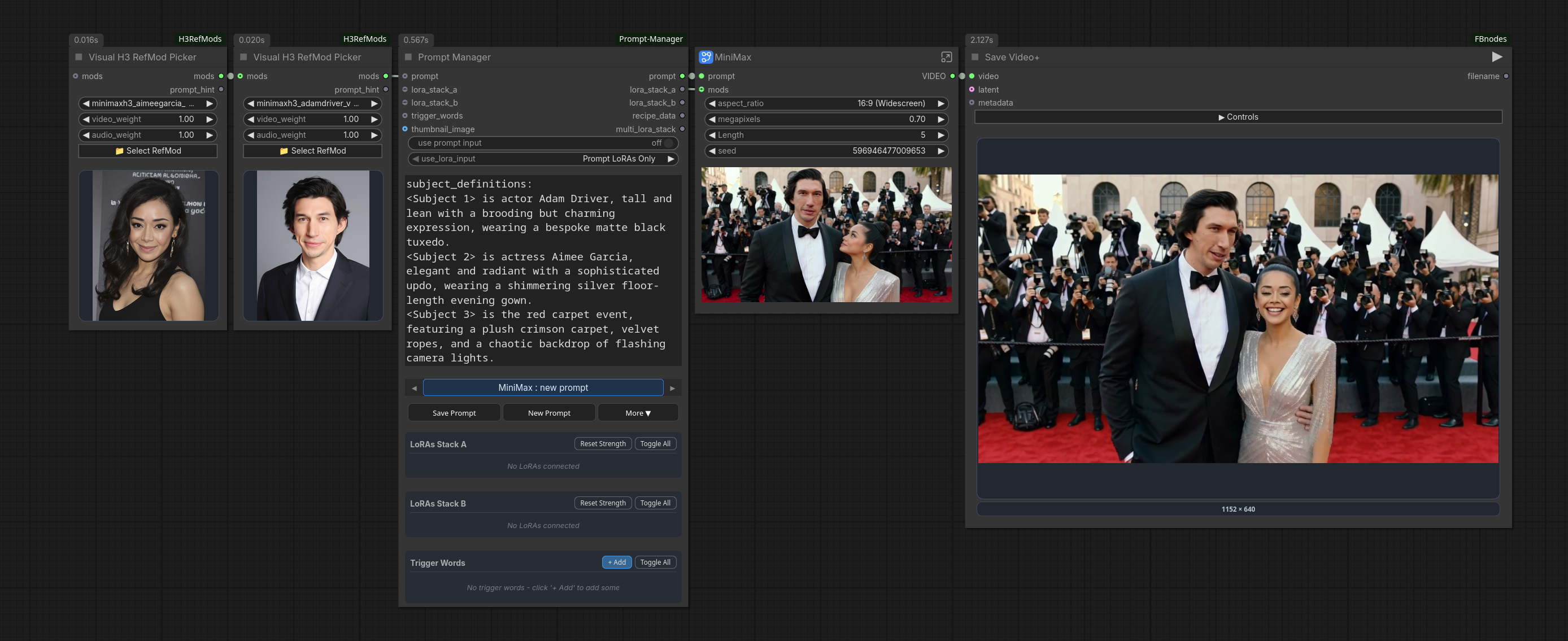
Use Left and Right arrows when over Picker to switch quickly.
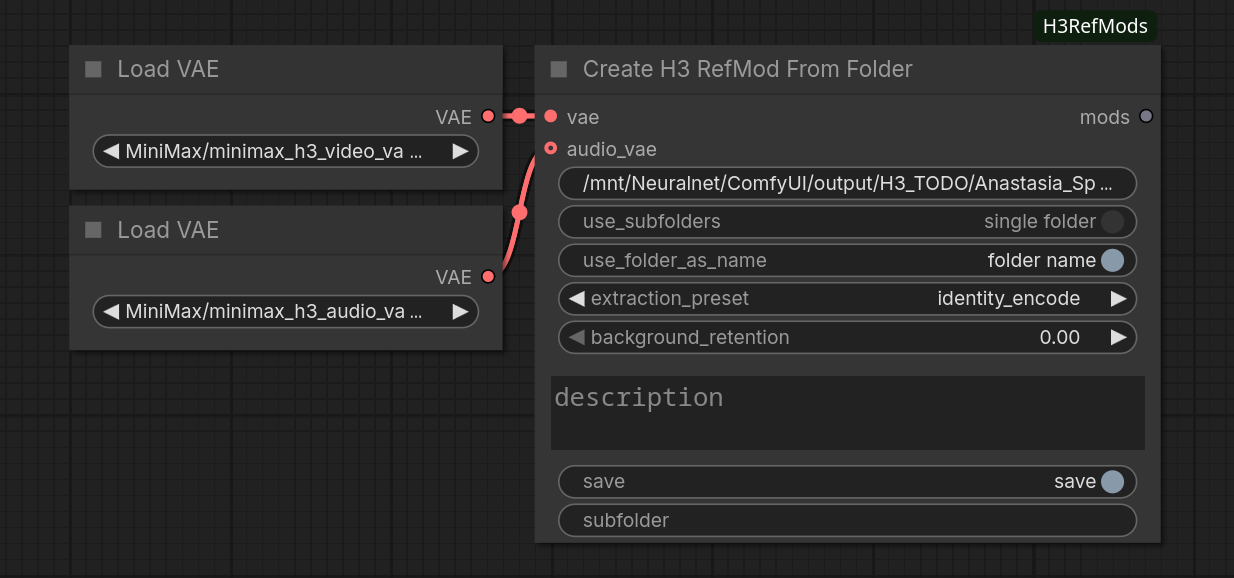
Create refMods from Folder example.
## Main additions
- `Visual RefMod Picker` lets you browse using a **RefMods** browser. It supports legacy split RefMods and the newer single-file bundle format.
- For legacy split RefMods, found pairs are grouped as one item in the picker. They are shown as one entry and loaded together, with separate video/audio weight controls. This uses a weight behavior: `0..1` is regular strength, values above 1 expand into repeated copies. For example, a weight of 2.7 would be the same as strength: 1.0, copies: 2.7.
- `Create H3 RefMod From Folder` scans a folder of reference images and optional audio, and saves in the bundle format by default. Around six to ten images can be sufficient. It can also batch-create RefMods for all subfolders found. The optional `include_images` switch adds reconstructed encoder pictures to visual RefMods while keeping the existing latent format compatible; it is off by default.
- `Load RefMod Simple` is a singular loader. It supports standalone visual/audio RefMods and the new bundle format, while still using the same weight behavior as the Picker.
- `MiniMax H3 RefMods to Video` grounds prompt labels with RefMod pictures and applies their visual/audio latents, returning positive conditioning, an empty AV latent, and a reference map. Optional ordinary media can be added through `Collect H3 References`. It replaced minimax's Reference to Video node. It takes in mods as an input, bypassing the need to apply the RefMods using an apply node.
- `Apply H3 RefMod Simple` is a streamlined version of the Apply H3 RefMod, without the extra controls.
## RefMods to Video Node
The grounded RefMods-to-Video node builds on work by [Adudeguyman's ComfyUI-Fantastic-MiniMaxH3-PromptBuilder](https://github.com/Adudeguyman/ComfyUI-Fantastic-MiniMaxH3-PromptBuilder). This also revisits earlier visual-grounding experiments this add-on had initially, which were perhaps set aside a little too quickly :)
Unlike plain prompt encoding followed by RefMod Apply, this node gives the text encoder visual content behind labels such as `` and `